Frequently Asked Questions About Call Identification
Discover how to protect yourself from unknown calls and phone scams with advanced technology and practical tips.

Frequently Asked Questions About Call Identification
How to protect yourself from unidentified calls and phone scams? In Israel, unidentified calls have become a real threat to our privacy and finances. Nearly half of Israelis (42%) have fallen victim to financial fraud or phishing attacks. However, there are tools and tips that can help you avoid harm:
- Call identification technologies: Apps like Traceback identify suspicious numbers in real-time and provide caller information.
- Blocking unwanted calls: Both Android devices and iOS allow manual and automatic blocking of unidentified numbers.
- Additional tools: Google searches, social media, and community reporting sites can help identify callers.
- Privacy protection: Check app permissions, update your operating system, and avoid sharing personal information.
What should you do if you receive a suspicious call?
- Don't rush to answer.
- Document the call details (number, time, content).
- Report to authorities like the Police, National Cyber Directorate, or Supervisor of Banks.
Proper use of tools and technologies will protect you from dangerous calls and prevent unnecessary harm.
The Russian Sting: Phone Scams We All Need to Know
How Call Identification Technology Works
When a call is received, the network transmits the caller's number along with the call itself. However, technical limitations and compatibility issues can cause this information to be inaccurate – and sometimes it simply doesn't appear.
In Israel, caller ID display for local calls is defined as "not guaranteed" by telecom providers. International incoming calls also often suffer from this issue. Beyond that, there are additional reasons why caller ID doesn't display, as explained below.
Why Some Calls Show as 'Unknown Number'
There are several main reasons for this phenomenon. One is partial information transfer between telecom networks, especially in international calls or cases where telecom providers aren't technically compatible with each other.
Additionally, some callers deliberately choose to hide their number. This can be done by dialing a special code before the number or through hiding settings on the phone. While there are cases where hiding is justified, it's often an attempt to bypass identification – for less transparent reasons.
Israeli Telecom Provider Systems
Beyond technical limitations, Israeli telecom providers also face additional regulatory and technological challenges regarding call identification. Not all providers support call identification apps at the same level, which can cause significant gaps in user experience.
For example, call identification services aren't always available with providers like Golan, 018, and Partner. In contrast, providers like Cellcom, Pelephone, Wecom, and Hot Mobile offer support, though sometimes complex manual setup is required.
Differences in protocols and technical limitations of each network make it difficult to create a unified call identification solution. While there's been some improvement in this area, challenges still exist, and the path to full support across all networks is still long.
| Caller ID Type | Incoming Calls (PSTN to Twilio) | Outgoing Calls (Twilio to PSTN) |
|---|---|---|
| Local (within Israel) | +E.164 format | Local (not guaranteed) |
This table illustrates the lack of uniformity in call identification in Israel. Even local calls don't always display reliable caller ID, which explains why so many calls arrive without any information about who's calling.
How to Identify Unknown Callers
When you receive a call from an unfamiliar number, don't rush to answer. Instead, there are several simple and effective ways to check who's behind the call and avoid scams or harassing calls. Here are some tips to help you handle such situations.
Google search is an initial and easy way to start. Simply type the number in quotes in the search engine, and you'll see if there's any available information about it. Sometimes you'll find reports from other people or discover that the number belongs to a specific business. However, this method doesn't always yield results, especially with new or private numbers.
Call Identification Apps
Call identification apps offer a more advanced solution. They use extensive databases and user reports to identify who's calling, even before you answer.
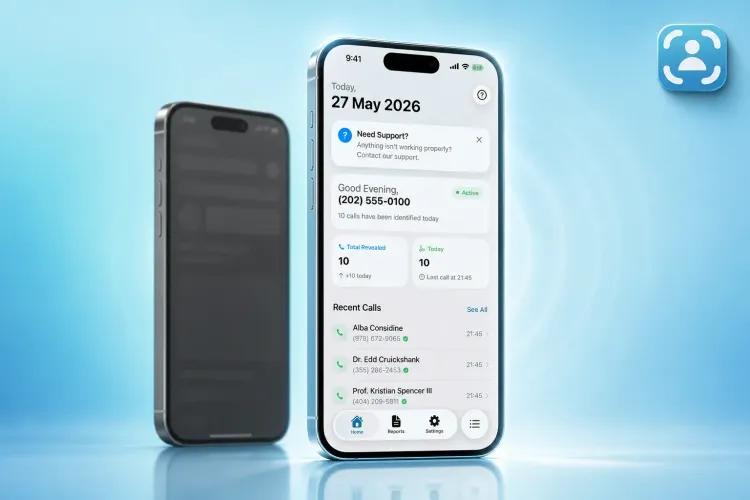
Traceback, for example, is a popular Israeli app that allows you to identify calls from hidden numbers. It's available for iOS and Android devices, and supports all telecom providers in Israel. The app provides real-time identification of calls from unknown numbers, detailed call history, and even alerts about missed calls.
Pricing: 13 NIS per week, 22.90 NIS per month, or 225 NIS per year. Traceback emphasizes privacy and also allows report exports for users.
The standout advantage of such apps is their ability to work in real-time. The moment a call is received, the app compares the number to its database and displays information about the caller - whether it's a business, government entity, or number reported as suspicious.
Additional Methods for Identifying Numbers
Beyond apps, there are several other ways to find out who's calling.
- Social media: Sometimes a quick search of the number on Facebook or other networks can give you an immediate answer.
- Community reporting sites: On such sites, users share experiences and reports about suspicious numbers. If the number is harassing many people, you'll likely find detailed information about it.
- Contacting your telecom provider: Some Israeli telecom providers offer basic identification services or can provide information about suspicious numbers in special cases.
If you're receiving repeated calls from a number that doesn't leave a voicemail or SMS, this may be a warning sign. Legitimate callers usually leave a message if it's an important matter.
Combining several methods is the best way to get a clearer picture. Use Google, apps, and community reporting sites together to understand who's trying to contact you. This combined approach will give you the tools to decide whether to answer or ignore.
How to Block Unwanted Calls
After learning to identify unknown callers, the next step is understanding how to block harassing calls. Both Android devices and iPhones offer built-in options for this, and there are also apps that provide an additional layer of protection.
Blocking Calls on Android and iOS Devices

On iPhone devices, you can enable the "Silence Unknown Callers" feature via: "Settings → Phone → Silence Unknown Callers". This feature automatically sends calls from numbers not in your contacts to voicemail. The calls will still appear in your recent calls list, so you can follow up if you wish.
If you prefer to block numbers manually, simply go to Recent Calls, tap the "i" next to the desired number and select "Block this Caller". To manage your blocked numbers list, go to "Settings → Phone → Blocked Contacts" where you can add or remove numbers as needed.
On Android, the process is similar – long-press the number in the call log and select "Block". Some Android devices also offer advanced options, like automatic blocking of unidentified numbers.
Note: Operating system updates are very important. They not only improve performance but also include fixes that help filter spam calls more effectively.
Using Apps for Call Identification and Filtering
Call identification apps are an excellent tool for preventing unwanted calls. For example, the Traceback app identifies suspicious calls in real-time, based on updated data and user reports. This way you can make an informed decision whether to block the number or not.
To ensure such apps work optimally, they need to be configured correctly. On iPhone, go to "Settings → Phone → Call Blocking & Identification" and enable the apps you want to use. This action will grant them permission to identify and block suspicious calls.
Combining the built-in tools in devices with specialized apps will give you more comprehensive protection against harassing calls.
Privacy and Data Security
Beyond blocking call guidelines, it's important to understand how to protect your personal information. While call identification apps provide a useful service, they require access to sensitive information. Therefore, it's important to understand how they process data and take simple steps to maintain privacy.
How Apps Handle Your Information
Call identification apps sometimes collect details like contact lists, call history, and even location information. Before installing a new app, it's worth checking what data it requests access to.
For example, the Traceback app focuses on collecting identification information only, and ensures data is transferred in an encrypted and secure manner. Quality apps include a detailed privacy policy that explains exactly how they use your information. It's important to read the policy carefully and if something seems unclear or concerning, consider looking for an alternative.
Protecting Your Personal Information
In Israel, the Privacy Protection Law (חוק הגנת הפרטיות), 1981, underwent significant updates (Amendment No. 13, 5774-2024) that will take effect in August 2025. The Privacy Protection Authority oversees digital personal information management. However, responsibility for protecting information starts with you.
- Check permissions: Make sure apps only get access to the data they need. On iPhone, go to "Settings → Privacy & Security" and check what data is accessible to each app. On Android, you can check this in "Settings → Apps → Permissions".
- Update software regularly: Regular updates to your apps and operating system close possible security vulnerabilities.
- Change sharing settings: Some apps share information with third parties. If you're not comfortable with this, adjust the settings or choose a different app that better suits your needs.
Remember that your information is yours alone. Demand complete transparency and careful protection in every app you use.
Reporting Fraud Calls to Authorities
If you've identified a suspicious call and managed to prevent harm, the next step is reporting it to the appropriate authorities. This is an important move that can help not only you but others as well, by preventing similar cases in the future. In Israel, several authorities handle fraud call complaints, each focusing on different areas. Here's a guide to help you document and report in an organized manner.
Submitting Reports to Relevant Authorities
Police and Ministry of Public Security: If you received a call where someone impersonated a police representative or other government entity, contact the police via the 100 hotline or the official website. The police primarily handle cases of financial damage or identity theft.
National Cyber Directorate: If the suspicious call is related to cyber threats, you can contact the Cyber Emergency Team at 119 or email 119@cyber.gov.il. The directorate focuses on protecting the civilian sector from cyber incidents, including those that start with fraud calls.
Supervisor of Banks at Bank of Israel: Cases where people impersonate banks, credit companies, or even the Bank of Israel itself are handled by the Supervisor of Banks. In March 2023, the Supervisor warned the public about criminal elements impersonating bank representatives or credit card companies.
"The public is asked to increase vigilance and not provide personal or classified details. We wish to note that the Bank of Israel, banking corporations, and credit card companies will not contact citizens requesting personal and confidential information or financial details including authentication and identification means sent to the person making contact, such as SMS containing a personal code." - Bank of Israel
If you've been exposed to such fraud, first contact the security department or public complaints commissioner of your bank or credit company. If you don't receive a satisfactory response, transfer your complaint to the Banking Supervision Department at the Bank of Israel.
Privacy Protection Authority: If the fraud call resulted in damage to your personal information, you can contact this authority, which handles complaints related to personal information protection.
Creating Organized Documentation
Before contacting authorities, it's important to document all details related to the suspicious call. Accurate documentation will help authorities handle the complaint more efficiently and prevent further damage.
- Record the phone number, date, time, and call description. If possible, also document the location and time zone where you received the call.
- In case of financial damage, immediately report to the bank, credit company, or payment app you used, and save receipts. Check if the transaction can be cancelled.
- If personal information was provided, such as ID number or passwords, change passwords immediately and monitor for signs of identity theft.
To streamline the process, you can use apps like Traceback, which allow exporting reports with call history, timestamps, and additional technical information. Detailed and accurate documentation will allow authorities to act quickly and efficiently, thereby protecting you and others.
Summary
Call identification has become an especially important tool in the fight against fraud and protecting our personal information, particularly in an era where suspicious calls have become routine.
Beyond that, legal protection in Israel emphasizes the need for advanced technologies in this field. The Privacy Protection Law (חוק הגנת הפרטיות) defines privacy violations as serious offenses, with severe penalties. The Privacy Protection Authority has even expanded its enforcement powers, including the ability to impose significant financial penalties on those who breach information security. The meaning is clear: protecting your personal information isn't just a matter of convenience – it's essential. Using tools like Traceback can help you maintain full control over incoming calls and reduce risks.
To stay updated on everything related to call security, it's worth following changes in the Privacy Protection Law and related regulations. You can contact the Privacy Protection Authority for information and guidance through the official website or by phone at *3103.
Ultimately, every unidentified call could be a potential attempt to compromise your privacy. Using advanced call identification tools not only protects your personal information but also saves possible financial damage.
Don't wait – start using advanced call identification tools today. This is a critical step for protecting your personal information.
FAQs
How does the Traceback app protect my privacy while identifying calls?
The Traceback app emphasizes protecting user privacy through a combination of advanced technologies and strict procedures. One of the central tools is data encryption, which ensures your information is protected from unauthorized access. Additionally, the app only collects the information necessary for its operation, and is careful to avoid collecting unnecessary data.
The app also operates in accordance with Israeli privacy protection laws, and provides a clear and transparent privacy policy that explains how your information is collected, used, and stored. It's worth reviewing the privacy policy to understand exactly how the app protects your personal information.
Why do some calls appear as unidentified numbers, and how can they be identified?
Calls that appear as "unidentified number" usually occur when the caller chooses to hide their number, or when the service provider fails to transmit caller details. In some cases, this also happens with calls from international numbers or certain services that prefer not to reveal their identity.
If you want to deal with such calls smartly, there are several options:
- Call identification apps: Such apps can help identify unfamiliar numbers.
- Privacy settings on phone: Check if you can configure the device to block anonymous calls.
Important to remember: Always be careful and don't provide personal information to callers you don't identify. This is a simple step that can prevent unpleasantness.
How can you report fraud calls to the appropriate authorities in Israel?
If you received a fraud call, there are several ways to report it and help reduce the phenomenon, while preventing further harm. In Israel, you can contact the following entities:
- Israel Police: You can file a complaint at the nearest police station or call the 100 hotline in urgent cases.
- Consumer Protection Authority: In cases of fraud related to commerce, you can contact the Consumer Protection Authority at 1-700-722-222 or through their website.
- Telecom companies: Report the suspicious number to your cellular company to check the possibility of blocking it.
To make it easier for authorities to handle, be sure to keep accurate documentation of call details: phone number, date, time, and call content. This information can be critical in handling such cases.
⚠️ Disclaimer: This article is general information only and does not constitute legal advice. For any specific legal situation, consult a qualified attorney. Traceback is not responsible for legal outcomes.