No Caller ID on iPhone: What It Means and How to Reveal Who Called
The complete guide to identifying hidden calls on iPhone, what Apple offers, what's missing, and how Traceback reveals the real number


Someone calls and your screen displays "No Caller ID." You don't answer. But the phone keeps ringing, the same anonymous number, again and again. Apple gives you tools to block or silence, but none of them tell you who it is. This guide explains exactly what "No Caller ID" means in your iPhone's call notification, what iOS offers out of the box, where built-in protection ends, and how Traceback reveals the real number within seconds, even when the caller hid it.

Photo: Pixabay
What "No Caller ID" Means in iPhone Call Notifications
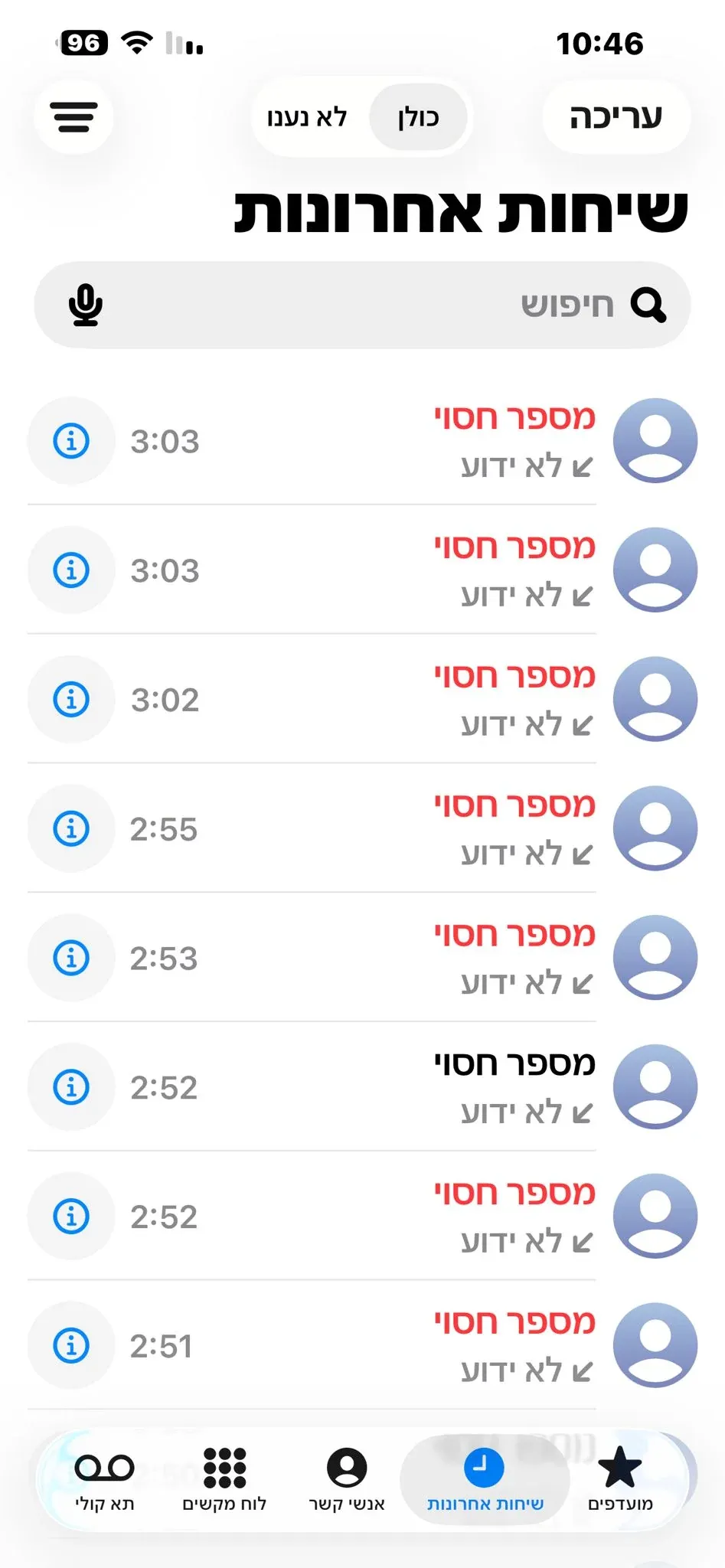
When you see "No Caller ID" on your iPhone screen, it means the caller activated number blocking before dialing you. In Israel, most carriers (Pelephone, Cellcom, Partner, Hot Mobile, and others) display the Hebrew words "מספר חסוי" (hidden number), while in English it appears as "No Caller ID."
The precise difference between terms:
- מספר חסוי (Hebrew): This is what your Israeli carrier sends to your iPhone when someone calls with number hiding enabled
- No Caller ID (English): The exact same situation, just in iOS's English interface
- Unknown: A number the network failed to identify for technical reasons, not due to intentional hiding
How number hiding works at the network level:
When someone wants to call you without revealing their number, they dial #31# before each call or enable permanent number hiding in their phone settings or through their carrier's service. This prefix tells the cellular network: "Forward the call, but don't send the source number to the destination device." The network honors this request and forwards the call with a "Caller ID Restricted" flag instead of the real number.
What Apple receives from the network and why it can't display a number: When the call reaches your iPhone, iOS reads the signaling data from the network. If the carrier sent a "hidden number" flag instead of a real number, Apple simply can't display what it didn't receive. This isn't Apple's decision, it's a protocol-level limitation: the number is physically not transmitted to your device.
Why iOS distinguishes between "Unknown" and "No Caller ID": "Unknown" appears when the network failed to identify the number (for example, a call from a legacy system, synchronization error, or international call with a protocol issue). "No Caller ID" or "מספר חסוי" appears when the caller intentionally requested number hiding. The distinction matters: in both cases you don't see the number, but the intent is different.
What iOS Offers Out of the Box, and Where It's Not Enough
Silence Unknown Callers
Setting location:
Settings → Phone → Silence Unknown Callers
What happens when enabled:
When this feature is active, iOS allows calls from numbers in your contacts, numbers you recently dialed, or numbers Siri suggested (for example, if you received an SMS from that number) to ring normally. Everything else, including calls from "No Caller ID," goes straight to voicemail without ringing.
The main drawback:
Even legitimate calls (new doctor, delivery driver, customer service you didn't save, job interviewer) won't ring if the number isn't in your contacts. It's too broad a filter: it silences everything, not just harassment.
Why it doesn't solve hidden calls:
A No Caller ID call won't ring, that's true, but you still don't know who called. It will appear in your "Missed" list (Recents) as "No Caller ID," and you're left in exactly the same position: no information, no way to call back, no ability to know if it was urgent or spam.
Manual Blocking Through Recents
How to block:
Open Recents, tap the blue i next to the number, scroll down and choose "Block this Caller."
The main problem:
iOS doesn't let you block "No Caller ID" as a category. You can only block a specific number that appears in the log. Hidden calls don't leave a number in the log, they remain "No Caller ID," so there's nothing to block. The "Block this Caller" button simply won't appear if you tap the i next to "No Caller ID."
Why it's frustrating:
If you're receiving repeated hidden calls, you're stuck. You can't block the caller because there's no number to block, and you can't silence everyone because it might be urgent.
Third-Party Apps from the App Store
What they can do:
Apps like Truecaller or Hiya connect to a community database and can display a name or tag (spam, scam, telemarketing) for identified numbers. If someone calls you from a regular number that appears in the database, you'll see "Likely spam" on the call screen.
What they can't do:
Reveal a number the network didn't send. If the screen says "No Caller ID," no app will see the real number, because iOS itself didn't receive it. The app gets the same information the system gets, and if it's "Caller ID Restricted," there's nothing to identify.
Quick test:
Install Truecaller, receive a hidden call, and you'll see the app displays no new information. It can only work with numbers that are already identified.
How Traceback Reveals Hidden Numbers on iPhone, the Technical Explanation
Why Call Forwarding Is the Key
Traceback uses a method that bypasses the Caller ID limitation: call forwarding. When you activate call forwarding from your iPhone to the number Traceback provides, the cellular network sends the entire call, including the original number the network knows, to the company's server.
How it works at the network level:
Caller ID hiding only applies to the destination device's display. That is, when the caller requests number hiding, the network hides it from you, but the number still passes in the signaling data (SS7/SIP) that manages the call. When the call is forwarded to a system (not a regular device), the network sends the complete signaling data, including the source number, to the receiving party.
What Traceback does:
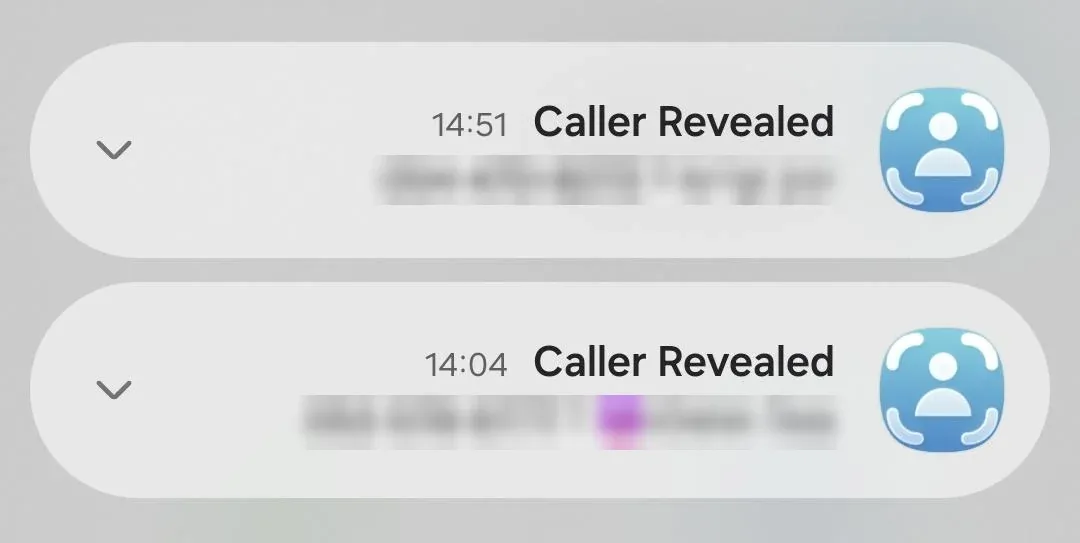
Traceback's server analyzes the signaling data the moment the call arrives, identifies the real number (even if it was "hidden" on your device), and sends you a notification within seconds with the full number, cellular carrier, and geographic location (if available).
Why it works even when the number was "hidden":
Because the hiding was only in the display layer, not in the data transmission layer. The network always knows who's calling (needs to bill, route, enforce), it just doesn't show you that information when the caller requested hiding. When the call is forwarded to Traceback's system, the hiding is no longer relevant.
Installation Process, 4 Simple Steps
Step 1: Download the App
Go to the App Store, search for "Traceback" and download the app. iOS 13 and above supported.
Step 2: Choose a Subscription
Open the app and choose a subscription: weekly, monthly, or yearly. Monthly and yearly subscriptions include a 3-day free trial; weekly subscription without trial. All subscriptions include unlimited identifications.
Step 3: Activate Call Forwarding
The app will show you the exact code to dial in the phone keypad. Enter the code, press the call button, and the system will confirm "Call forwarding active." Traceback works with Pelephone, Cellcom, Partner, Hot Mobile, Golan Telecom, Rami Levy, 019, 012, and others.
Step 4: Let the Call Ring
When someone calls you (even with "No Caller ID"), the phone will ring normally. You can answer, ignore, or decline the call. In any case, Traceback will identify the number within seconds and send you a notification with the complete information.
What Happens to the Call Itself, Do I Miss Calls?
No. The call reaches you normally; active forwarding doesn't mean the call stops or goes to voicemail. Traceback only "listens" to the signaling data in the background, identifies the number, and releases the call back to you immediately.
What you see:
You see the same "No Caller ID" screen on the device (because iOS still didn't receive the number), decide whether to answer, and Traceback sends you the real number in a notification or in the app within seconds. If you don't answer, the number is already saved in Traceback's history and you can return to it later.
Why it doesn't hurt the experience:
There's no noticeable delay. The call proceeds exactly as it would without Traceback, only now you receive additional information that wasn't previously available to you.
Comparison Table, Methods for Identifying Hidden Calls on iPhone
| Method | Cost | Reveals Hidden Number? | Requires Technical Setup? | Works with Israeli Carriers? | Notes |
|---|---|---|---|---|---|
| Silence Unknown Callers (iOS) | Free | No | No | Yes | Silences unknown calls, doesn't reveal number |
| Manual Blocking via Recents | Free | No | No | Yes | Can't block "No Caller ID" as category |
| Caller ID Apps (Truecaller, Hiya) | Free-Paid | No | No | Yes | Identify spam but don't reveal numbers the network hid |
| Traceback | Paid | Yes | Yes (call forwarding) | Yes (Pelephone, Cellcom, Partner, Hot Mobile, Golan, Rami Levy, 019, 012, and more) | Reveals within seconds, unlimited identifications |
What to Do When You've Discovered Who Called, 3 Common Scenarios
1. It Was a Mistake or Legitimate Call
What to do:
Call back the revealed number (it's no longer "hidden" to you). Save the contact if relevant (doctor, service, etc.). If you no longer need Traceback, you can cancel the forwarding: dial #21# in the keypad, press call, and the system will confirm "Call forwarding canceled."
2. It's Telemarketing or Harassment
What to do:
- Generate a report in the app: Traceback allows you to produce a report with date, time, number, carrier, and all identified information.
- Save the report: In case you want to contact the police or consumer protection authority, this report helps document the harassment.
- Block the real number: Now that you know the number, you can block it via iOS (Recents → i → Block this Caller).
- Report the number: Share the number in community apps like Truecaller or other caller ID apps, so others know it's spam.
3. It's a Threat or Scam
What to do:
- Don't call back: Don't dial back to the identified number.
- Save the report from Traceback: The report includes the source number, call time, carrier, and additional information.
- Report to police with the report: The report provides initial information that helps document the harassment.
- Block the number immediately: Go to Recents → i → Block this Caller.
FAQ, No Caller ID on iPhone
How do you know if a hidden number is spam or a legitimate call?
You can't know in advance. Some businesses use number hiding (banks, service centers, emergency services in certain cases), but so does most telemarketing and fraud. The safest approach: don't answer, and let Traceback reveal the number. If it's legitimate, you can call back the real number that was revealed. If it's spam, you'll know immediately and can block.
Does call forwarding cost extra money?
Not with most carriers in Israel. Pelephone, Cellcom, Partner, Hot Mobile, Golan Telecom, Rami Levy, 019, and 012 include call forwarding in the regular subscription at no additional charge. If you're on a very old plan or special package, it's worth checking with the carrier.
If I cancel the forwarding, can Traceback still reveal calls?
No. Traceback needs active forwarding to receive signaling data from the network. Once you cancel the forwarding (code #21# in the keypad and press call), new calls won't be identified. Calls already revealed remain in the app's history and you can access them anytime.
Does Traceback hurt battery or iPhone performance?
No. The app is lightweight and runs in the background only to receive notifications from the server. Call forwarding happens at the network level, not on the device, so there's no load on the iPhone's processor or battery.
What happens if I receive a regular call (with Caller ID) while forwarding is active?
Traceback will identify it too (add it to the log) but won't send a notification, because you already see the number on screen. Forwarding doesn't change the experience of regular calls.
Can I use Traceback on a work number or office line?
Yes, if the line supports call forwarding. If the phone is managed by IT or an internal switchboard (PBX), you may need approval from management. Traceback works with cellular lines and with VoIP lines that support SIP protocol.
Is the revealed number always accurate?
Yes, provided the caller called from a real number the network recognizes. Traceback identifies the number that passed in the network's signaling. If the caller used a spoofed number, Traceback will reveal the spoofed number as it was transmitted in the network.
Written by: Tom Aflalo, Co-Founder, Traceback
⚠️ Disclaimer: This article is general information only and does not constitute legal advice. For any specific legal situation, consult a qualified attorney. Traceback is not responsible for legal outcomes.
Tom Aflalo is co-founder of Traceback, the app that reveals the real number behind hidden and No Caller ID calls. He works on the product and on the guides in this blog and help center, which are checked against how the app actually works.
feedback@trytraceback.com